Overview
A scanner tells a developer what is wrong. It rarely teaches them why. RansomLeak adds the missing step on the pull request, while the code is still fresh.
There are two free ways in, and both work without a RansomLeak account:
- Reads code scanning alerts or any SARIF file
- Matches each finding to a 5-10 minute lesson
- Posts one comment on the pull request
- Identifiers only, never source code
How it works
-
Your scanner runs on the pull request. That is GitHub code scanning for the App, or a SARIF file from CodeQL, Semgrep, Trivy, Gitleaks or similar for the Action.
-
Each finding is matched on its CWE. Secrets and dependency advisories match on the scanner type. SQL injection, XSS, path traversal, SSRF, hard-coded secrets and vulnerable dependencies all have a lesson.
-
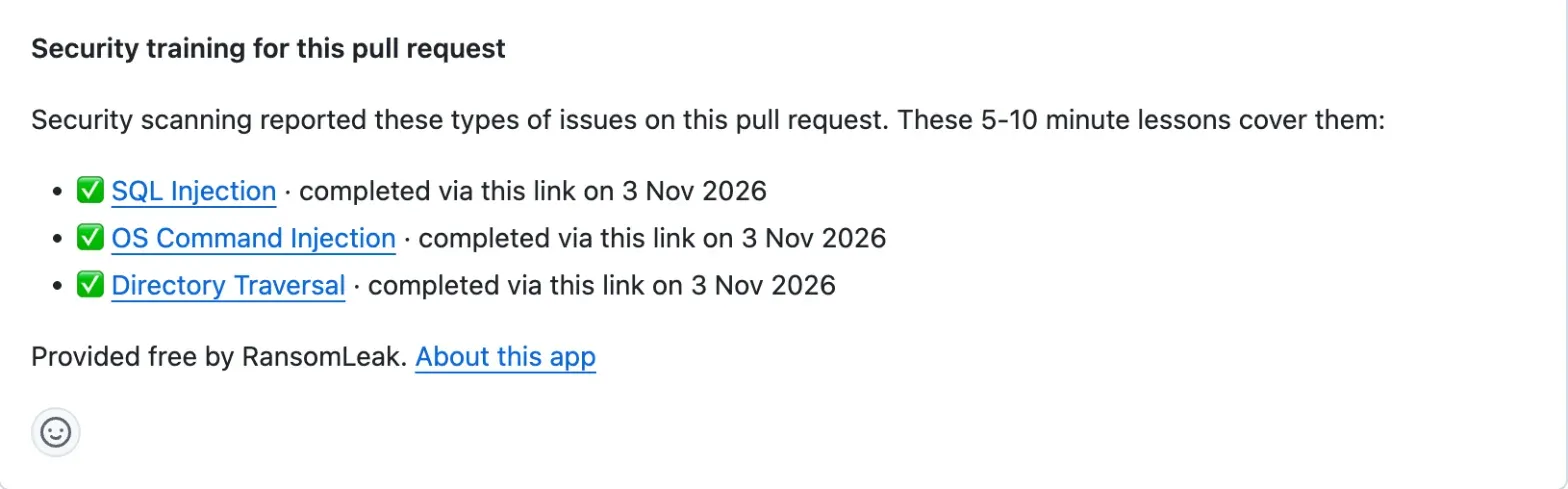
RansomLeak adds one comment to the pull request with up to five lessons, one per issue type. Later runs edit the same comment instead of adding new ones.
-
With the App installed, a finished lesson is ticked in the comment. The App also sets a check named RansomLeak Secure Coding, which never fails.
Pull requests without lessons never report the check, so do not make it required. Fixing the code does not remove the lesson from the comment.

GitHub App or GitHub Action
| GitHub App | GitHub Action | |
|---|---|---|
| Reads | GitHub code scanning alerts | A SARIF file from your scanner |
| Private repositories | Only with GitHub Code Security | Yes, without Code Security |
| Ticks finished lessons | Yes | Only if the App is also installed |
The GitHub App needs no configuration:
install it
on the repositories you choose. To use the
GitHub Action
(source on GitHub), add it after the step that writes your SARIF file. The workflow needs pull-requests: write and
id-token: write, and there is no secret to add:
- uses: ransomleak/secure-coding-action@v1
  with:
    sarif: results.sarif
Full steps are in the GitHub setup guide.
Permissions and data handling
The Action proves which repository it runs in with GitHub's OIDC token, so there is nothing to sign up for. What reaches RansomLeak is kept to identifiers.
| Data | How it is handled |
|---|---|
| Findings | Scanner name, CWE ids, whether a rule is a CVE or GHSA advisory, and the pull request number. No source code, file paths or snippets. |
| The developer | No per-developer record is kept on our side. |
| Installs | Uninstalling the App deletes its record. Action-only use keeps one numeric GitHub account id, removed on request. |
For how RansomLeak handles data, see the privacy policy and the security and compliance page.
Frequently asked questions
Does RansomLeak integrate with GitHub?
Yes. RansomLeak offers a free GitHub App, RansomLeak Secure Coding, and a free GitHub Action. When code scanning or your own scanner flags a weakness on a pull request, a comment on that pull request links to a matched secure-coding lesson of 5-10 minutes. No RansomLeak account is needed.
Which scanners does it work with?
The App reads GitHub code scanning alerts, for example from CodeQL. The Action reads a SARIF file, so it works with CodeQL, Semgrep, Trivy, Gitleaks and other tools whose rules carry a CWE, a CVE or a GHSA, plus secrets scanners.
Should I use the App or the Action?
Use the App if code scanning already runs on the repository: public repositories, or private ones with GitHub Code Security. Use the Action for private repositories without Code Security, or for any scanner that writes SARIF. Install the App as well if you want finished lessons ticked on the pull request.
Does it block the merge or fail the build?
No. The App sets a check named RansomLeak Secure Coding that is neutral while lessons are open and success when they are finished. It never fails. The Action never fails your workflow either: if something goes wrong, it logs a warning and carries on.
What data does RansomLeak receive?
Identifiers only: the scanner name, the CWE ids of the rules that produced a result, whether a rule is a CVE or GHSA advisory, and the pull request number. No source code, file paths or snippets are sent, and RansomLeak keeps no per-developer record.
Does a tick prove who did the training?
No. The lesson link belongs to the pull request, not to a person, so anyone who can open the pull request can complete it. Treat the tick as a nudge in review, not as proof of individual training.
Need a hand?
Email support@ransomleak.com and we will help you connect GitHub to your tenant.