Security awareness training for any LMS, via SCORM or LTI
Run RansomLeak on our platform, or deliver it inside the LMS your team already uses. Export SCORM 1.2 and 2004 packages, or launch via LTI 1.3 with completion and scores written straight back to your gradebook.
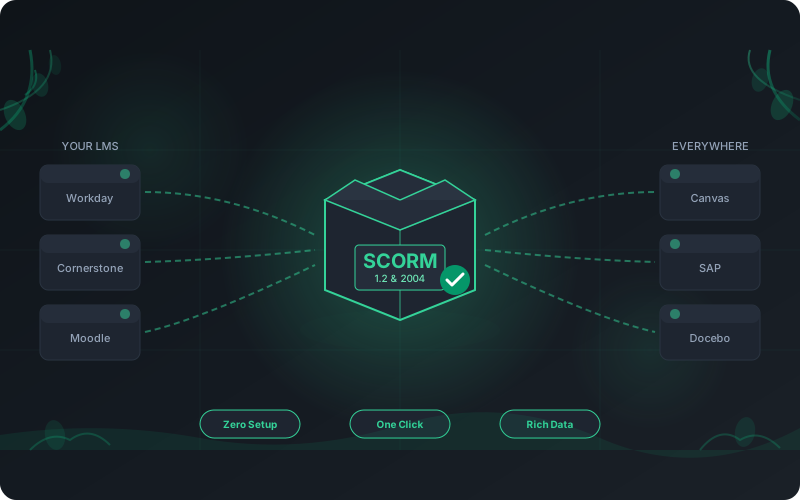
Why Deliver Security Training Through Your LMS?
Meeting people in the LMS they already use is more than convenient. It is a strategic advantage:
Zero Integration Work
Deploy training to your LMS without API development, custom code, or an IT project. Upload a SCORM package or register an LTI tool once.
Universal Compatibility
Works with your existing LMS, whether Workday, Cornerstone, SAP SuccessFactors, Docebo, Moodle, or Canvas.
Centralized Reporting
Completion and scores land in the reporting your team already runs, next to every other course.
No Vendor Lock-In
Switch LMS platforms without losing content or redoing integration work. The standards travel with you.
Compliance Documentation
Keep audit trails and completion records in your existing LMS. See our framework mapping for details.
Familiar User Experience
Employees launch security training from the same portal and single sign-on they already use every day.
How RansomLeak Deploys Into Your LMS
Three ways to deliver the same immersive content. Pick the one your LMS prefers, or mix them across teams.
SCORM 1.2 & 2004
Export a SCORM package and upload it like any other course. Universally supported, with nothing to wire up between your LMS and RansomLeak at setup.
LTI 1.3 Launch
Your LMS launches RansomLeak through single sign-on, and instructors deep-link a specific exercise, course, or learning path. Learners get the live, always-current content, and scores post back automatically via LTI Advantage.
Hosted or xAPI
No LMS? Run training on our built-in Cloud LMS. Need a learning record store? We can report results over xAPI on request.
SCORM vs LTI: Which Should You Use?
Both put RansomLeak inside your LMS and report results to your gradebook. The difference is how the content is delivered and how fresh it stays.
| What matters to you | SCORM 1.2 / 2004 | LTI 1.3 |
|---|---|---|
| How it works | Upload our package to your LMS | Your LMS launches RansomLeak via single sign-on |
| Assigning content | One uploaded package per course | Deep-link a specific exercise, course, or learning path |
| Content freshness | Re-export to pick up updates | Always the live, current exercise |
| Results to your LMS | Completion and score inside the package | Completion and score posted to the gradebook (AGS) |
| Setup | Download a .zip, upload it, done | Register our tool once with three URLs |
| Best for | Any SCORM LMS, fastest first deployment | Canvas, Moodle, Brightspace, Blackboard, and LTI 1.3 enterprise LMSs |
Not sure? Start with SCORM for the fastest deployment, then move to LTI when you want live content and automatic grade passback. You can run both at once.
How Does RansomLeak Implement SCORM?
SCORM 1.2 & 2004
Full compliance with both major SCORM versions
One-Click Export
Generate packages instantly with no configuration
Rich Tracking
Complete data reporting to your LMS
Here is what RansomLeak's SCORM support includes:
- Dual Standard Support: Full compliance with both SCORM 1.2 and SCORM 2004 standards.
- One-Click Export: Generate SCORM packages directly from the RansomLeak platform with a single click.
- Rich Data Tracking: Automatically reports completion status, quiz scores, time on task, and simulation performance.
- Interactive 3D Compatibility: Our immersive 3D security simulations run inside SCORM packages with full tracking.
- Reliable Resume: Learners can start training and resume exactly where they left off.
- Third-Party SCORM Import: Upload SCORM packages from other vendors into the platform and manage all your training content in one place.
Launch via LTI 1.3 With Deep Linking and Grade Passback
RansomLeak is a full LTI 1.3 Advantage tool provider: single sign-on launch, grade passback (AGS), roster sync (NRPS), and deep linking. Any compliant LMS launches our content and records the result in its own gradebook. Most security awareness vendors ship SCORM only, so native LTI, let alone the complete Advantage suite, is rare in this category. Here is what our LTI support includes:
- LTI 1.3 Single Sign-On: Learners launch from your LMS and land in the exercise already authenticated. No second password and no manual account setup.
- Assign Exactly What You Want with Deep Linking: From the assignment screen in your LMS, instructors open the RansomLeak picker and choose a specific exercise, a full course, or a multi-step learning path. The LMS stores that selection, so the right content launches every time, with no links to paste.
- Automatic Grade Passback: Completion and score post back to your LMS gradebook through LTI Advantage Assignment and Grade Services (AGS).
- Roster Sync (NRPS): RansomLeak can read your course membership over Names and Role Provisioning Services, so learners are lined up ahead of launch with no manual import.
- Always-Current Content: An LTI launch loads the live exercise, so learners always get the latest version with nothing to re-export when content updates.
- Self-Service Setup: Register RansomLeak as a tool in minutes by pasting three URLs, the same kind of exchange your team knows from SAML single sign-on.
- Verified on Moodle and Canvas: We test the full launch-to-gradebook flow end to end on real Moodle and Canvas, and against the 1EdTech reference implementation.
Setting up a specific platform? Follow the step-by-step Moodle LTI guide or Canvas LTI guide.
Which Learning Management Systems Are Compatible?
RansomLeak works with all major LMS platforms through SCORM packages or LTI 1.3 launch. We have tested with these:








Note: This list represents platforms we have explicitly tested. If your LMS supports SCORM 1.2, SCORM 2004, or LTI 1.3, RansomLeak content will work even if your platform is not listed above.
What SCORM Versions Does RansomLeak Support?
RansomLeak supports both major SCORM versions to ensure maximum compatibility:
SCORM 1.2
The most widely adopted SCORM standard, supported by virtually every LMS platform. SCORM 1.2 provides robust tracking of completion, scores, and session data. Ideal for organizations prioritizing maximum compatibility.
SCORM 2004 (4th Edition)
The enhanced SCORM standard offering advanced features like sequencing rules, more detailed progress tracking, and richer data models. SCORM 2004 provides additional flexibility for complex learning paths and sophisticated reporting requirements.
Pick the SCORM version your LMS needs. Most platforms support both, and you can switch versions any time.
| Feature | SCORM 1.2 | SCORM 2004 |
|---|---|---|
| LMS Compatibility | Virtually all LMS platforms | Most modern LMS platforms |
| Completion Tracking | Pass/fail, complete/incomplete | Detailed progress with multiple states |
| Score Reporting | Single score (0-100) | Multiple score types with scaled scoring |
| Sequencing Rules | Not supported | Advanced sequencing and navigation control |
| Data Model | Basic (CMI data model) | Extended with interaction tracking |
| Bookmarking | Basic suspend/resume | Detailed activity state preservation |
| Best For | Maximum compatibility, simple tracking | Complex learning paths, detailed reporting |
Try a Real SCORM Package in Your LMS
Download a working sample module and upload it to your LMS. Confirm it plays, tracks completion, and reports scores before you commit to anything.
What's in each package
- A full interactive module: a ransomware attack simulation
- Reports completion, score, and time spent to your LMS
- The same package your team exports in-product
Free, no signup. Upload the .zip straight to your LMS, the same way you would any SCORM course.
Frequently asked questions
What is SCORM?
SCORM (Sharable Content Object Reference Model) is a technical standard that defines how e-learning content communicates with Learning Management Systems. It ensures training packages created in one tool can run inside any compliant LMS without modification, tracking completion, scores, and time spent automatically.
Every modern enterprise LMS supports at least one SCORM version.
What is LTI, and how is it different from SCORM?
LTI (Learning Tools Interoperability) is a standard that lets your LMS launch an external tool through single sign-on and receive grades back. Where SCORM is a package you upload and host in your LMS, LTI launches the live RansomLeak app from your LMS and posts completion and scores to your gradebook automatically.
In short: SCORM is a file you host, LTI is a live connection. SCORM is the fastest first deployment; LTI keeps content always current.
Does RansomLeak support LTI?
Can instructors pick which exercise or course to assign from inside the LMS?
Does RansomLeak support the full LTI Advantage suite?
Which SCORM versions does RansomLeak support?
Which LMSs can launch RansomLeak via LTI?
Will my LMS track completion and scores?
Can I try a SCORM package before buying?
How do I deploy RansomLeak content to my LMS?
Can I use RansomLeak without an LMS?
Can I import third-party SCORM packages into RansomLeak?
What if my LMS isn't listed?
Does this send learner data outside our network?
See RansomLeak in Action
Try the free exercises or book a demo to see analytics, SCORM export, SSO, and custom content in your environment.