
Quishing (QR Code Phishing): How to Stop It
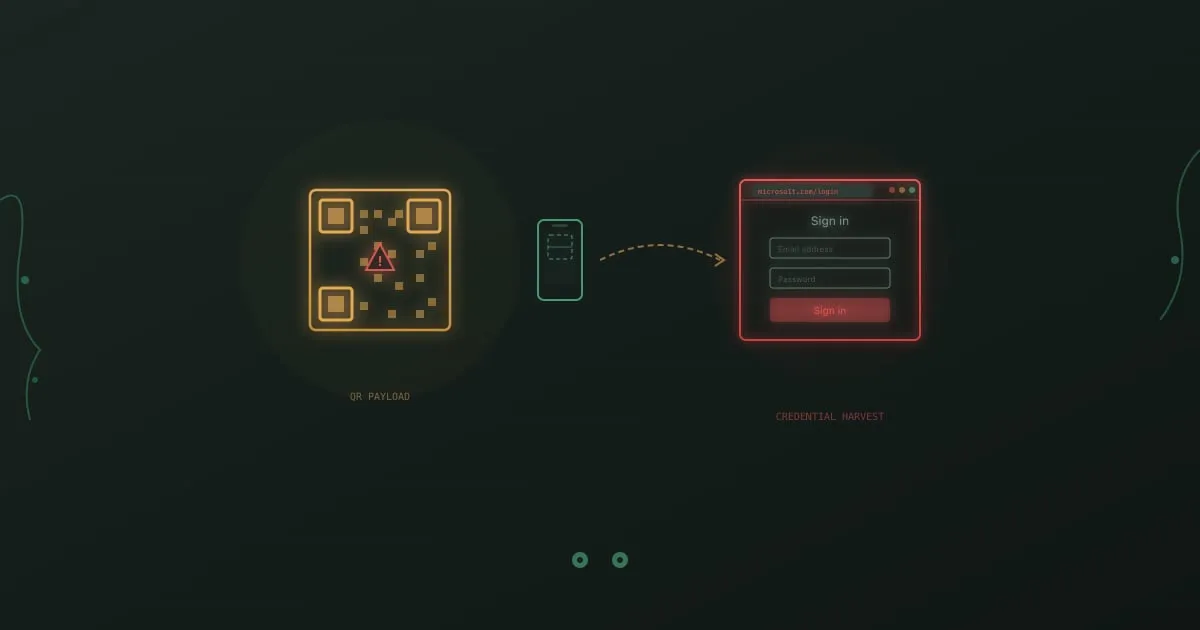
Quishing is phishing delivered through a QR code. The attacker encodes a malicious URL inside a square of pixels, drops it into a corporate email or prints it over a legitimate sign, and lets the target’s phone do the rest. Email filters see an image, not a link. The victim scans on a personal device that sits outside every corporate security control. That mismatch is what makes quishing work.
What is quishing?
Section titled “What is quishing?”Quishing is a phishing technique where attackers encode a malicious URL inside a QR code and deliver it via email, printed material, or physical placement. When the target scans the code, their phone opens a credential-harvesting page, an OAuth consent prompt, or a drive-by download. The name combines “QR” and “phishing.”
The attack has a clear structural advantage over a normal phishing link. A secure email gateway can parse URLs, rewrite them, and check them against threat intelligence in milliseconds. It cannot read a picture. And even when an email gateway decodes the QR code correctly, the scan usually happens on a personal phone that lives outside every enterprise control your team has configured.
According to Abnormal Security’s 2024 threat report, QR code phishing volumes grew more than 400% in the second half of 2023 compared with the same period a year earlier. HP Wolf Security has since documented sustained campaigns impersonating Microsoft 365, DocuSign, and internal HR portals through 2024 and into 2025.
Why quishing works in 2026
Section titled “Why quishing works in 2026”Three properties make quishing hard to stop with conventional tools.
Email gateways were never built for images. A Secure Email Gateway inspects URLs, attachments, and sender reputation. QR codes sit inside an image file, and some attackers now build the code in HTML tables or ASCII art so it does not even register as an image. Microsoft, Proofpoint, and Abnormal have added image-level decoders, but detection is inconsistent, especially when the URL chains through three or four redirects before landing.
The attack jumps to an unmanaged device. The victim reads the email on a managed laptop behind a web proxy and endpoint agent. They scan the code with a personal phone that has no proxy, no DNS filter, and no DLP client. The credential theft happens on a device the security team cannot see.
The pretext mixes authority with low friction. A printed notice that says “scan for quick MFA re-enrollment” combines a familiar brand with a frictionless action. Banks, parking meters, restaurants, and shipping carriers have all trained people to scan codes without thinking. Attackers exploit that learned behavior directly.
How quishing attacks spread
Section titled “How quishing attacks spread”Email is the most common delivery path, but it is not the only one.
Corporate email with QR code lures. The most documented variant. Messages impersonate Microsoft Authenticator enrollment, DUO re-authentication, DocuSign envelopes, SharePoint sharing notifications, and internal HR policy updates. Some emails explicitly claim the process “only works on mobile” to justify the QR format. Cofense and Perception Point both tracked surges of these through 2024, with Microsoft 365 login as the overwhelming target.
Physical poster and sign overlays. Attackers print a small QR sticker and place it over a legitimate code on parking meters, restaurant menus, or transit ticket machines. The FBI’s Internet Crime Complaint Center issued a public advisory in January 2022 after tampered parking meter codes in Austin, San Antonio, and other cities redirected drivers to fraudulent payment portals. The same playbook is now appearing on conference badges and lobby signage.
Postal mail and package notices. The Swiss National Cyber Security Centre (NCSC) warned in late 2023 about physical letters impersonating the Swiss postal service, with QR codes that downloaded Android banking trojans. US consumers have reported similar scams mailed as IRS notices, benefits updates, and toll road invoices.
Internal documents after an initial breach. Once attackers gain access to a single corporate account, they embed QR codes in internal wikis, shared PDFs, and Slack pins. These carry higher trust because they come from “inside,” and they route around outbound email scanning entirely.
Multi-channel combos. Quishing pairs well with callback phishing. One email includes both a QR code and a phone number. “Scan or call for faster service.” Two attack paths in one message, and neither contains a clickable URL.
How to spot a quishing attempt
Section titled “How to spot a quishing attempt”Most detection advice for link-based phishing does not apply to quishing, because there is no link to hover over. Use this four-step check instead.
Question why a QR code is necessary
Section titled “Question why a QR code is necessary”Ask why the sender chose a QR code instead of a normal URL. Internal systems and legitimate services always have navigable login pages, so a QR code in a corporate email is almost always unnecessary and suspicious.
If the email claims to be from IT, HR, or a vendor, picture how they would normally ask for this action. Internal password resets happen inside the identity provider. DocuSign sends an envelope link. Microsoft sends a deep link to its own portal. A QR code short-circuits every one of those expected flows, which is the point for an attacker and the red flag for a reader.
Check the sender carefully
Section titled “Check the sender carefully”Inspect the actual sender address, not the display name. Quishing emails impersonate Microsoft, Google, DocuSign, and your own domain. A mismatched or random sender domain is the single strongest signal.
Open the full headers if your mail client hides them. Look for SPF, DKIM, and DMARC failures. A message that claims to come from security@microsoft.com but fails DMARC is not Microsoft, regardless of how clean the logo looks.
Preview the QR destination before visiting
Section titled “Preview the QR destination before visiting”Both iOS and Android briefly show the destination URL before opening the browser. Read it. If the domain does not match the claimed sender, or it is a URL shortener like bit.ly, treat it as malicious and do not tap through.
Practice this with a safe code first. Open the camera, frame a known QR code, and wait until the URL banner appears. If you did not know the banner existed, you are not alone, and you are also the target audience for an attacker who expects you to tap without reading.
Verify through a separate channel
Section titled “Verify through a separate channel”If the message claims you need to re-authenticate, navigate to the service directly by typing the URL yourself. Never use the contact method provided in the suspicious message.
The same rule applies to physical codes. If a parking meter QR code looks off, pay through the official app or by the published phone number. If a letter claims to be from your bank, call the number on the back of your card. Out-of-band verification defeats the entire class of attacks.
Real examples from 2024 and 2025
Section titled “Real examples from 2024 and 2025”US federal agency campaign. Cofense disclosed a late 2024 campaign that sent Microsoft-branded MFA enrollment emails to staff at a US federal agency. The QR codes resolved to an Evilginx2 reverse proxy that harvested both credentials and session cookies, letting the attackers bypass MFA on more than 40 mailboxes before the campaign was contained.
Energy sector spear quish. Perception Point reported a targeted quishing run in Q1 2025 against operators at a North American energy utility. The lure posed as a DocuSign vendor agreement, and the codes pointed to lookalike SSO pages themed for the utility’s identity provider. Several operators entered credentials on their personal phones, and attackers used the access to stage further business email compromise against the accounts payable team.
Parking meter scam with direct dollar losses. The FBI’s January 2022 advisory remains one of the best-documented physical quishing events. Austin police alone tracked more than 20 tampered parking meters, and multiple drivers reported card fraud within hours of scanning. Individual losses ranged from a few hundred dollars to several thousand once attackers tested stolen card details.
If your history of real incidents is not documented, a plausible scenario is enough for training. A logistics company receives an internal-looking email with a QR code and the text “scan to re-accept the updated vendor code of conduct.” The destination is a Microsoft 365 consent screen. The first user to scan on their phone grants an attacker-controlled OAuth app read access to their mailbox. Within an hour, the attacker is replying to invoice threads from inside the trusted account.
How to defend your organization
Section titled “How to defend your organization”No single control stops quishing. Defense needs to cover email, devices, and behavior in parallel.
Apply email filter rules for inline QR codes. Microsoft Defender, Proofpoint, and Abnormal all now decode QR codes inside images and render the underlying URL for inspection. Turn those policies on, then tune them to quarantine messages that contain a QR code, an external sender, and any urgency language in the same body.
Lock down QR scanner apps with MDM. Most platforms let you require the native camera app for QR scanning, block sideloaded scanner apps, and force URL previews before navigation. iOS and Android both support this through standard mobile device management policies.
Run quishing in your simulation program. Generic phishing tests do not build the right reflex, because they still reward hovering over links. Include QR-code scenarios in your phishing simulation training rotation, and use the free QR code phishing exercise so every employee encounters one before they meet a real one.
Deploy domain-locking password managers. A password manager that only autofills on the exact domain it stored the credential for will refuse to populate on a quishing page. That single control defeats credential harvest in most of the documented campaigns.
Build a reliable report-a-phish channel. Employees need one button in their mail client and one short number in their corporate directory to report a suspicious message, whether it is email, SMS, or a physical poster. Reports compound. The third employee who flags a quishing email often saves the seventh from falling for it.
Audit physical signage and printed materials. Assign office managers a quarterly walk-through to inspect posters, lobby signs, and conference handouts for tampered QR codes. A small sticker applied over a legitimate code is surprisingly easy to spot when someone is looking.
Require phishing-resistant MFA. Hardware security keys and platform authenticators cannot be relayed by an adversary-in-the-middle proxy, which is what most quishing kits now include. One-time codes can. If your identity provider supports passkeys or FIDO2, this is the single most effective change you can make.
Limit external OAuth consent. Many quishing campaigns end in an attacker-controlled OAuth application rather than a cloned login page. Microsoft 365 and Google Workspace both let you require admin approval for third-party app consent. Turn it on for anything that requests mailbox, drive, or calendar scopes.
Quishing vs email phishing vs smishing
Section titled “Quishing vs email phishing vs smishing”The three share a goal and diverge on the delivery channel. Traditional phishing arrives as email with a clickable URL, and the classic defense is to hover the link, inspect the domain, and verify the sender. Smishing arrives as a text message and relies on small-screen truncation plus personal device trust to bypass corporate filters entirely.
Quishing combines the worst properties of both. The message arrives in corporate email, but the action happens on a personal phone. Secure email gateways lose the URL in the image, and mobile browsers lose it in the preview banner. Each channel needs its own detection reflex, which is why training that only covers “hover over the link” leaves a real gap.
Train employees to recognize quishing
Section titled “Train employees to recognize quishing”Quishing-specific habits are narrow enough to teach in one short session and valuable enough to practice every quarter. Focus the session on the four-step check above, then reinforce with hands-on exercises from the security awareness catalogue.
Our QR code phishing exercise puts learners in front of a realistic corporate quishing email, lets them preview the destination, and walks them through the decision to scan or not. For broader coverage, the free RansomLeak learning library includes related exercises on callback phishing, smishing, and business email compromise, because quishing rarely lands alone.
Is quishing different from phishing?
Section titled “Is quishing different from phishing?”Quishing is a variant of phishing that delivers the malicious URL through a QR code instead of a clickable link. The goal is identical, but the detection signals are different because a QR code bypasses link-based filters and moves the attack to the victim’s phone.
Can email filters catch quishing?
Section titled “Can email filters catch quishing?”The best email security platforms decode QR codes inside images and inspect the embedded URL, but detection rates are inconsistent. Attackers use redirect chains, reputable URL shorteners, and multi-image splitting to confuse scanners. Treat gateway filtering as a helpful layer, not a complete defense.
Are some QR codes always safe?
Section titled “Are some QR codes always safe?”No QR code is safe by default, including codes printed by brands you trust. Physical codes can be overlaid with a sticker, and digital codes can be swapped in compromised email threads. Preview the destination before you tap, every time.
What apps can preview QR codes safely?
Section titled “What apps can preview QR codes safely?”The native camera apps on iOS and Android both show the destination URL as a banner before opening the browser. Do not install a third-party “QR scanner” app from an unknown publisher. Many of those apps request broad permissions and can themselves act as a malware channel.
Is it safe to scan a QR code with a password manager open?
Section titled “Is it safe to scan a QR code with a password manager open?”Scanning itself does not expose credentials. The risk starts when the page loads and asks for a login. A password manager that domain-locks autofill will refuse to populate on a lookalike domain, which is a useful secondary check, but the primary decision is to not load the page in the first place.
Can MFA stop quishing?
Section titled “Can MFA stop quishing?”Traditional one-time-code MFA does not. Most quishing kits relay the code through a proxy in real time. Phishing-resistant MFA like hardware security keys, passkeys, or platform authenticators cannot be relayed and does stop the attack.
How often should employees train on quishing?
Section titled “How often should employees train on quishing?”At least once per year as part of phishing awareness training, plus one simulation per quarter. QR code pretexts evolve faster than annual refreshes, so short, realistic practice matters more than long sessions.
What should I do if I already scanned a malicious QR code?
Section titled “What should I do if I already scanned a malicious QR code?”If you entered credentials, change the password on that service immediately and revoke active sessions. Notify your security team, preserve the original email, and check for unexpected OAuth grants or mailbox forwarding rules. Quick action is often the difference between a close call and a full account takeover.
Bottom line
Section titled “Bottom line”Quishing is not a new attack. It is a delivery trick that converts a well-understood phishing chain into one that bypasses email filters and shifts credential theft onto a device you cannot monitor. The fix is not one control. It is better email decoding, mobile policies, phishing-resistant MFA, and a specific set of reflexes for the people who scan the codes.
If you want your team to meet a realistic quishing email in training before they meet one in production, start with the free QR code phishing exercise and pair it with the broader security awareness catalogue.
Sources
Section titled “Sources”- Abnormal Security, H2 2023 Email Threat Report
- Cofense, 2024 Annual State of Email Security Report
- HP Wolf Security Threat Insights
- FBI IC3 Public Service Announcement on QR Code Scams, January 2022
- Swiss NCSC Advisory, QR Code Phishing by Post, November 2023
- Verizon 2024 Data Breach Investigations Report