
AWS Cloud Security Misconfigurations to Fix First
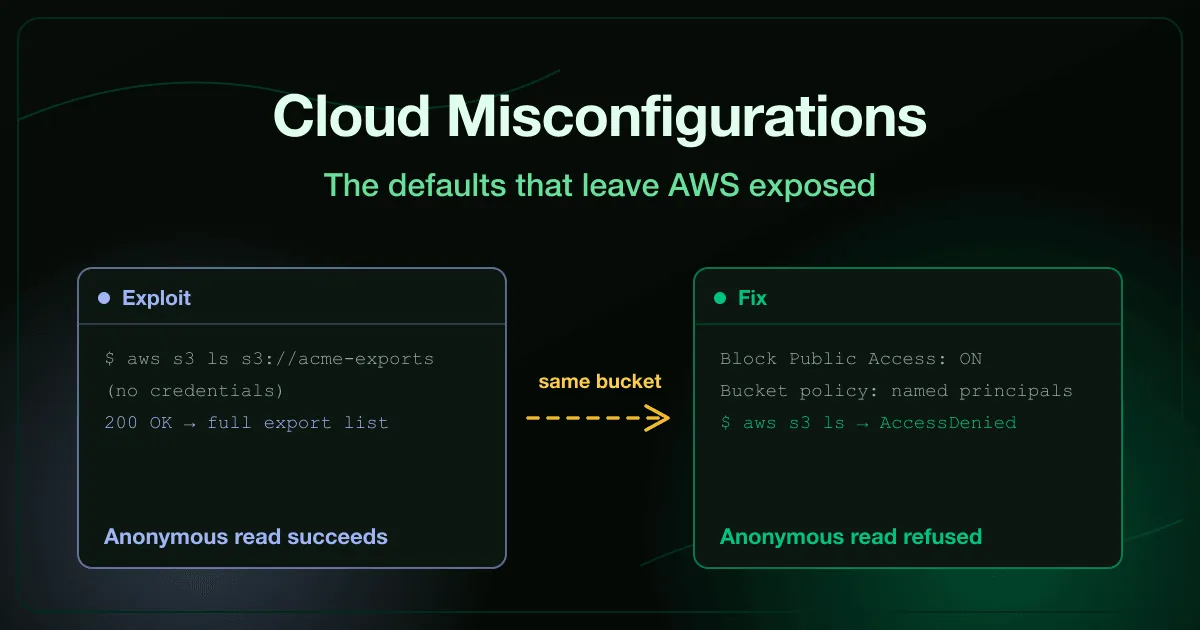
A support page told customers to allowlist a storage hostname so their downloads would work. Nobody thought twice about publishing that hostname, because knowing a name is not the same as having access to it.
Except it was. Asking that hostname for a listing worked from an ordinary browser with no credential offered and none required, and next to the folder the company meant to publish sat one nobody did, full of client records.
Nothing about that bucket was exploited in the traditional sense. A permission that AWS makes off by default was switched on at some point, by someone, for a reason that made sense at the time, and it stayed on because nothing about a misconfigured setting looks different from a correct one until someone asks it the right question.
What is a cloud security misconfiguration?
Section titled “What is a cloud security misconfiguration?”A cloud security misconfiguration is a control that exists in the platform but was set, or left unset, in a way that grants access nobody intended. It covers storage permissions, network rules, DNS records left pointing at retired resources, and audit trails that do not cover every region an account uses.
Unlike a software vulnerability, nothing needs to be exploited. The setting itself is the entire problem.
Gartner has said for years that the large majority of cloud security failures are the customer’s misconfiguration rather than a flaw in the provider’s platform. AWS ships secure defaults for most of these controls. The incidents happen when a later change quietly moves a resource away from that default.
What are the most common AWS misconfigurations?
Section titled “What are the most common AWS misconfigurations?”Grouped by the layer where the setting lives, since each one has a different owner and a different fix.
Storage: buckets that answer strangers
Section titled “Storage: buckets that answer strangers”Bucket names follow company conventions and turn up in page source, mobile app bundles, and support documentation, so an attacker rarely needs to guess blind. Listing a bucket and reading its objects are separate permissions that get granted together by accident, which is how an anonymous request ends up returning a customer export. The public storage buckets exercise has you find and read exactly that kind of exposure, then close it with account-level block-public-access as the backstop and a bucket policy that names who may read what.
Network: security groups open to the internet
Section titled “Network: security groups open to the internet”A security group is the firewall, and a single rule field decides whether a database is reachable only from the application tier or from every address on the internet. An open database port is an invitation rather than a break-in on its own, but teams that assume a port is unreachable rarely put a strong login behind it either. The cloud network exposure exercise has you connect straight to a production database with no application in the path, then scope the rule to the app subnet and make the case for keeping databases out of public subnets entirely.
DNS: subdomains pointing at nothing
Section titled “DNS: subdomains pointing at nothing”Retiring a cloud resource without removing the DNS record that points at it leaves a name you still own aimed at whatever anyone claims next. The record is real, the certificate is issued legitimately, and the page arrives from your actual domain, which is why a phishing page served this way defeats the address-bar check that awareness training usually relies on. The subdomain takeover exercise has you claim exactly that kind of dangling record, then fix it by removing the record the same day the resource is decommissioned rather than treating decommissioning as finished when the resource itself is gone.
Visibility: audit trails that do not cover the account
Section titled “Visibility: audit trails that do not cover the account”An audit trail that covers one region and not the others has a blind spot an attacker with any foothold can find and use immediately, and turning the trail off mid-incident hides everything that happens after. You cannot reconstruct what was never recorded. The cloud audit logging gaps exercise has you work an incident where exactly that happened, then fix it with account-wide logging, log file validation, an alarm on any change to the trail configuration, and delivery to an account the source cannot reach.
Which AWS security misconfigurations should you fix first?
Section titled “Which AWS security misconfigurations should you fix first?”Ordered by how much exposure each fix removes, not by how it reads in an audit checklist.
- Turn on block-public-access at the account level before touching any individual bucket policy. It is the backstop that holds even when someone writes a careless policy again next quarter.
- Grant bucket listing and object read as separate, deliberate permissions. Treating them as one grant is how an anonymous request ends up reading data nobody meant to publish.
- Scope every security group rule to the subnet or service that actually needs the port, never
0.0.0.0/0. A rule that answers the whole internet is rarely a decision anyone made on purpose. - Keep databases out of public subnets entirely. A firewall rule is one setting away from being wrong. A private subnet removes the exposure as a category.
- Remove the DNS record the same day a resource is decommissioned, not on a later ticket. A dangling record is a claimable name for as long as it exists.
- Scan for records still pointing at resources you no longer own. Decommissioning tends to happen faster than anyone documents it, so a scan finds what a policy alone will miss.
- Enable your cloud audit trail account-wide, across every region, before you need it. A trail that covers the region you deployed in first and nothing else is a blind spot with your name on it.
- Turn on log file validation and alarm on any change to the trail’s own configuration. Disabling logging is the one action whose success hides every action that follows it.
How do you train engineers on cloud security misconfigurations?
Section titled “How do you train engineers on cloud security misconfigurations?”Most teams learn these the way the company in the opening story did, from a researcher’s report or a bill five times its normal size. That is expensive training, and it only covers the one misconfiguration that happened to get found.
The alternative is running the exposure yourself before it is live in production. An engineer who has listed a bucket with no credentials and watched a customer export come back checks block-public-access on every account afterward, without being reminded.
That is how our Cloud Infrastructure Security exercises work, nine exercises we shipped under the Cloud Security category alongside the existing container course. Each one puts you on the attacking side of a real exposure first, then has you ship the fix and prove it closed.
If identity is where you want to start instead of the network and storage layer, AWS IAM best practices to stop privilege escalation covers the role and key failures that sit underneath most of these incidents. Our container security best practices guide covers the adjacent surface at the image and runtime layer.
Frequently asked questions
Section titled “Frequently asked questions”How do attackers find public S3 buckets if they do not know the name?
They enumerate. Bucket names follow company conventions and turn up in page source, mobile app bundles, build logs, support documentation, and public repositories, and scanners that check internet-wide naming patterns run continuously. Guessing a name from a convention takes seconds, not days.
Is fixing one bucket policy enough once an exposure is found?
No. The bucket policy is the specific mistake, but the account setting is the backstop. Fixing only the bucket that was found leaves the same permission mistake available on every other bucket in the account, which is why block-public-access belongs at the account level first.
Why does a subdomain takeover work even though our domain was never compromised?
Because the domain itself is fine. The problem is a DNS record still pointing at a resource that no longer exists, and cloud providers let anyone claim an unclaimed resource name. The record, the domain, and the certificate are all genuinely yours, which is exactly what makes the resulting page convincing.
What is the difference between a security group and a network ACL?
A security group is stateful and attached to a resource, so a rule that allows inbound traffic automatically allows the matching outbound reply. A network ACL is stateless and attached to a subnet, evaluated before traffic ever reaches the security group. Most exposures trace back to the security group rule, since that is the one teams edit most often.
Does enabling an audit trail after an incident recover what was missed?
No. Turning logging on does not backfill anything that happened before the setting changed, and a region that was never covered has no record to recover regardless of when you notice. The only fix that helps after the fact is covering every region before the next incident, not this one.
Start with one bucket
Section titled “Start with one bucket”Run an anonymous request against the storage bucket your team uses most and see what comes back with no credential attached. If it returns anything beyond an access-denied message, you have found the same misconfiguration that opens this article.
Our Cloud Infrastructure Security exercises are free to try, and you can talk to us about rolling them out across an engineering team.