
Container Security Best Practices for Images and Runtime
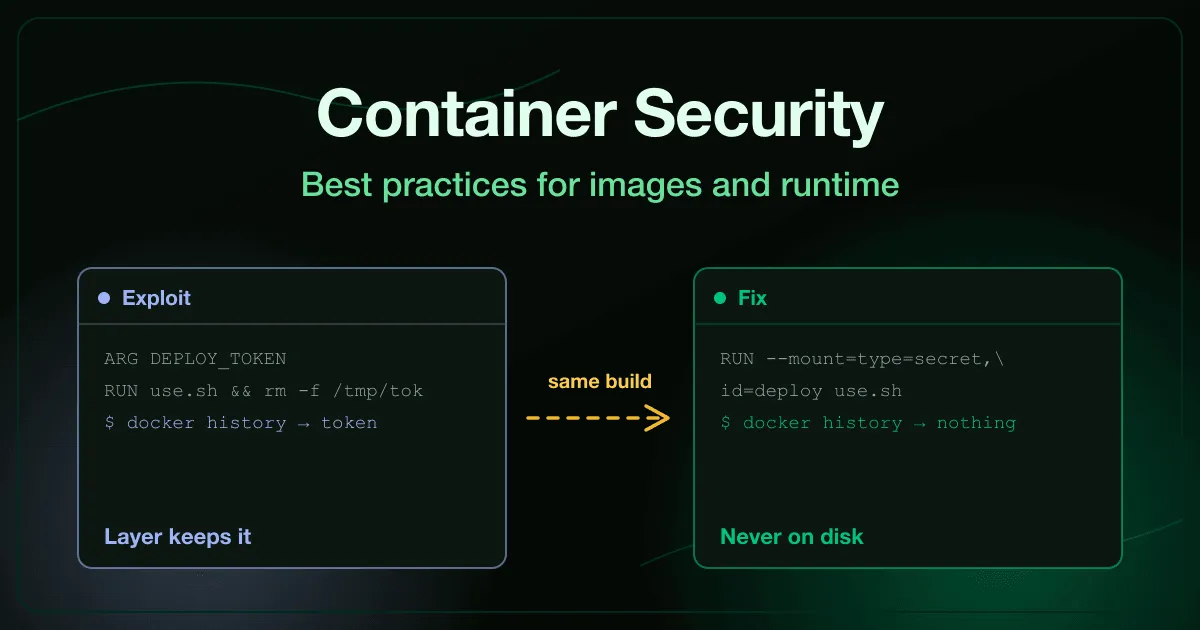
A build passes a deployment token into a RUN step, uses it, and deletes the file on the next line. The Dockerfile looks careful. The image is published to a public registry.
Image layers are append-only, so the delete did not remove anything. It stacked a new layer on top of the one still holding the token, and docker history reads it back in a single command.
That gap between what the Dockerfile appears to do and what the image actually contains is where most container security work lives. The runtime has a matching version of the same problem, where a flag added to make a container work in staging quietly hands it the host.
What is container security?
Section titled “What is container security?”Container security is the practice of treating the image and the runtime as security boundaries rather than packaging details. It covers what a built image contains, where that image comes from and who can push to it, what privileges the container runs with, and which ports and hosts it can reach once it is running.
NIST SP 800-190, the Application Container Security Guide, splits the problem the same way: image risks, registry risks, orchestrator risks, container runtime risks, and host OS risks. Most incidents come from the first four, and most of those are configuration rather than code.
The distinction that matters day to day is simple. Application security asks whether your code handles input correctly. Container security asks what your code inherits, what it runs as, and who else can reach it.
Why is container security different from application security?
Section titled “Why is container security different from application security?”An application vulnerability gives an attacker one thing: whatever that flaw allows. Container weaknesses decide how far that one thing travels.
A command injection in a service that runs as an unprivileged user in a distroless image gives an attacker a single command with no shell and no tooling. The same flaw in a privileged container with a host mount is root on the machine.
What decides the difference is what the image shipped and what the container was granted. Every tool inside an image is a tool the attacker inherits, and a container is a set of kernel features that a deployment can switch off.
The network adds a third variable. A port mapping is created by the container runtime on the host, so it never appears in a security group review.
What are the main container security risks?
Section titled “What are the main container security risks?”Grouping them by where the failure is introduced makes them easier to assign to a team.
Build: what ends up inside the image
Section titled “Build: what ends up inside the image”Secrets baked into layers are the most direct. A credential passed into a build stays in that layer permanently, and images published to public registries are scraped for exactly this. The secrets in image layers exercise has you pull a payments company’s published image, read a live token out of its build history, rotate the credential first, then rebuild with a BuildKit secret mount.
This is a different failure from a secret committed to a repository, even though the outcome looks identical. The persistence mechanism is layers rather than commits, and the fix is a build that never writes the value to disk. If you also have credentials in your version control history, the secrets in Git history exercise covers that half.
Oversized runtime images are the quieter build problem. A production image carrying a package manager, a compiler, a shell, and network utilities turns a limited flaw into a working toolkit. The minimal container images exercise cuts a 412MB runtime down with a multi-stage build, then proves the shell is gone.
Supply: where the base image came from
Section titled “Supply: where the base image came from”A floating base image tag means the layer beneath your code changes without anyone deciding it should. A stale one means published, known vulnerabilities ship on every deploy, in a layer no dependency file mentions. The vulnerable base images exercise scans a deployed image, pins the base by digest, moves to a slim variant, and rescans to prove the finding is gone.
Worse is a base that was hostile from the start. Anyone can publish under a name close to one you trust, and without signature verification a FROM line is just a string. The malicious base images exercise traces a cryptominer back to a lookalike publisher, then verifies signatures at pull time rather than after an incident.
Distribution: who can read and write your registry
Section titled “Distribution: who can read and write your registry”A registry holds your source, your configuration, and the artifact you deploy. Anonymous pull hands all of it to anyone who guesses the repository name, and anonymous push lets an attacker replace the tag you are about to ship.
The container registry exposure exercise covers both halves, ending with scoped push permissions and frozen release tags.
Runtime: what the container was granted
Section titled “Runtime: what the container was granted”The privileged flag plus a host mount turns code execution in a low-value workload into control of the machine underneath it. A process running as root inside a container is root on the host kernel, which surprises people the first time they see it. Work through it in the privileged containers exercise, which fixes the image and the deployment separately, because those are two different owners.
The Docker API is root-equivalent and ships with no authentication. A daemon told to listen on a network port with TLS off answers anyone who can reach it, and unlike a container escape this needs no foothold at all. The exposed Docker daemon exercise starts from a public status page that names a production node and ends at mutual TLS with a scoped socket proxy.
Network: what the mapping actually published
Section titled “Network: what the mapping actually published”Publishing a container port binds it to every interface by default. A mapping written the way a developer writes it on a laptop can put a database on the public internet when the same stack ships to production, and the cloud firewall never changes to reflect it.
On the default bridge network every container can also reach every other one. The container network exposure exercise connects to a published database port with no application involved, binds the mapping to loopback, and segments services onto a user-defined network.
Which container security best practices should you apply first?
Section titled “Which container security best practices should you apply first?”Ordered by risk removed per hour of work, not by where they sit in a benchmark.
- Scan images in CI and fail the build on critical findings in the base layer. This catches the category that no dependency review covers.
- Pin base images by digest. A tag is a moving target. A digest is the thing you actually tested.
- Use build-time secret mounts, never build arguments. A
--build-argcredential is recorded in the image. A BuildKit secret mount is not. - Split build from runtime with a multi-stage build. Compilers, package managers, and shells belong in the build stage and nowhere else.
- Run as a non-root user and drop capabilities by default. Set the user in the image so a deployment cannot silently regress to root.
- Never run privileged, and treat host mounts as a review gate. Both are occasionally necessary and always worth an explicit decision.
- Require authentication on the registry and freeze release tags. Anonymous pull is a data leak. Anonymous push is a supply chain compromise.
- Bind published ports to loopback unless a service is genuinely public. Then put the public ones behind a proxy you control.
- Never expose the Docker daemon on a TCP port without mutual TLS. If a container needs the socket, put a scoped proxy in front of it.
- Verify image signatures at pull time. Provenance is the only defense against a base that was never legitimate.
The CIS Docker Benchmark covers the same ground in far more detail and is worth running as an audit. Treat the list above as the order to fix things in, and the benchmark as the record of what you fixed.
How do you train developers on container security?
Section titled “How do you train developers on container security?”Most container guidance is a checklist, and checklists teach compliance rather than judgment. A developer can follow every rule above and still add --privileged at 6pm to make a build pass, because nothing in the checklist showed them what that flag actually grants.
What transfers is running the attack. A developer who has read a live token out of a public image’s layer history writes a different Dockerfile afterwards. One who has taken a host through an unauthenticated daemon adds the TLS config without being chased for it.
That is how our container and cloud security exercises are built. Each one puts you on the attacker’s side first, then has you ship the fix and prove the attack no longer works, on infrastructure that behaves like production. The Git and repository security catalogue covers the adjacent surface, where the same credentials tend to leak first.
Teams that own the services running in those containers usually need the API layer too. Our guide to API security best practices covers the authorization failures that an attacker reaches once they are inside the network, and the secure coding training roundup compares platforms on how much of this ground they cover.
Frequently asked questions
Section titled “Frequently asked questions”Is a container a security boundary?
Not by default. A container is a set of kernel namespaces and cgroups, and a deployment can disable nearly all of them without anything appearing broken. It becomes a boundary when you run as a non-root user, drop capabilities, avoid privileged mode and host mounts, and keep the host kernel patched.
Does deleting a secret in the Dockerfile remove it from the image?
No. Image layers are append-only, so a RUN that deletes a file adds a new layer recording the deletion while the earlier layer still holds the file. Anyone with the image can read it back with docker history or by unpacking the layer.
Treat any credential that entered a build as compromised and rotate it before changing the Dockerfile.
What is the difference between container security and cloud security?
Container security is a subset. It covers the image, the registry, the runtime, and the container network, while cloud security also covers identity and access management, storage configuration, provider-level network boundaries, and the control plane.
The container layer is where most developer-owned mistakes land, which is why it is usually the right place to start training.
Should we scan images or fix base images first?
Scan first, because you cannot prioritize what you have not measured, and a scan tells you whether the critical findings are in your dependencies or the layer underneath them. Then pin by digest so the result stays true, since a floating tag can reintroduce a finding you already cleared.
Is Docker less secure than Kubernetes?
The question is usually misdirected. Both run the same images with the same base-layer risk, and both let a deployment request privileges the workload does not need. Kubernetes adds policy tooling that makes those requests easier to block centrally, and it adds an orchestrator attack surface of its own.
Start with one image
Section titled “Start with one image”Run docker history against the image you deploy most often and read the build steps. If any of them passed a credential as a build argument, you have found the same bug that opens this article, and the credential is still live.
Then give your developers something to practice on. Our container security exercises are free to try, and you can talk to us about rolling them out across an engineering team.