
Zero-Day Patch Management: Installed Is Not Running
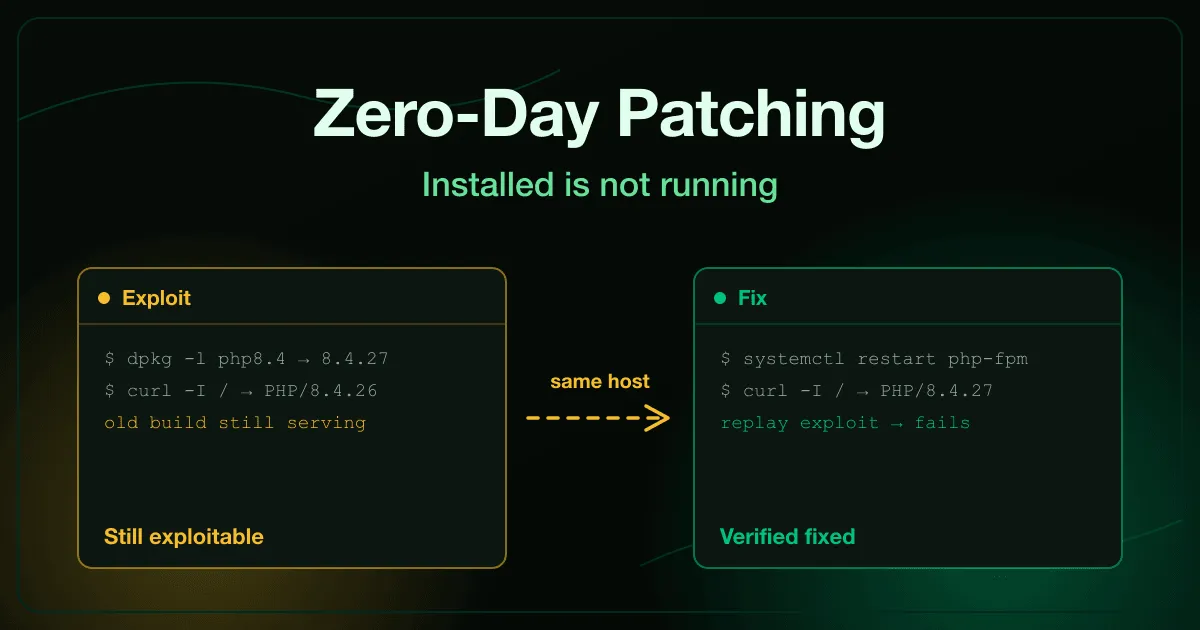
Zero-day patch management is the process of closing a vulnerability that attackers are already exploiting, often before or within hours of a vendor fix. It covers four steps: install the fixed build, make sure the running service actually loads it, verify the exploit fails, and clean up anything the attacker reached while the hole was open.
Most teams are good at the first step. The other three are where incidents keep happening.
What is the difference between installing and applying a patch?
Section titled “What is the difference between installing and applying a patch?”Installing a patch puts new files on disk. Applying it means the process serving traffic is running those new files, and that only happens after a restart or reload.
Long-running services hold the old code in memory. A web server, a PHP-FPM pool, a Java app server or a database will keep serving the vulnerable build until something restarts it. Your package manager, your asset inventory and your compliance scanner can all report “patched” while the live process is still exploitable.
Why do patched servers stay vulnerable?
Section titled “Why do patched servers stay vulnerable?”PHP2Shell is a clear example. It was the October 2026 PHP runtime flaw that gave attackers code execution from one unauthenticated request. The fix was a package update plus a restart of Apache or PHP-FPM. Hosts that only did the first half kept answering exploit requests while reporting the fixed version number.
The common causes are mundane:
- Change windows that allow the package update but defer the restart.
- Automatic updates that install silently and never bounce the service.
- Containers patched in place, which lose the fix the next time they are recreated from the old image.
- Appliances and vendor products that bundle their own copy of the runtime and ignore your OS updates.
How do you verify a zero-day patch actually worked?
Section titled “How do you verify a zero-day patch actually worked?”Check the running process, not the package database. Ask the service what it is serving: a version header, a status endpoint, or the binary path and start time of the live process.
Then replay a known-bad request against the patched host and confirm it fails. That one test catches a missed restart, a load balancer still sending traffic to an old node, and a container that was never rebuilt. Our components with known vulnerabilities exercise has you do exactly this for an outdated library: exploit it, bump the version, and prove the exploit no longer lands.
What should you do after patching a zero-day?
Section titled “What should you do after patching a zero-day?”With a zero-day, exploitation usually starts before the patch exists. Assume any exposed system was reached during that window, even if nothing has alerted yet.
- Hunt for persistence. Look for web shells, new scheduled tasks, unexpected accounts and files your deployment never shipped.
- Rotate secrets the system could read. Config files and environment variables on a compromised host are burned, even after the hole is closed.
- Report it. If personal data was reachable, your data protection team needs to know now, because breach notification deadlines run from awareness, not from the end of the investigation.
Patching is prevention. Cleanup is incident response, and it needs its own owner.
How do employees fit into zero-day patching?
Section titled “How do employees fit into zero-day patching?”Servers are not the only place a pending patch causes damage. On endpoints, the person in front of the screen often decides whether a critical update installs today or sits for a week behind “remind me later”.
The endpoint patching and EDR alerts exercise puts learners in that seat. An EDR alert reports a partially blocked credential theft attempt, a critical patch has been pending for three days, and the learner has to install it and file the incident report. Pair it with OS updates and patching basics from the Security Awareness catalogue so restart prompts stop being something people postpone.
A zero-day patch checklist
Section titled “A zero-day patch checklist”- Inventory every copy of the affected component, including containers, appliances and forgotten hosts.
- Apply a WAF or edge rule if one exists, and treat it as time bought, not a fix.
- Install the fixed build, then restart or redeploy so it is actually running.
- Verify the live version and replay the exploit to confirm it fails.
- Hunt for persistence, rotate exposed secrets and route any data exposure.
- Record what was exposed, what closed the hole and what cleanup remains.
Want your engineers and employees drilled on this before the next zero-day? See how the RansomLeak platform runs hands-on incident training, or talk to us.