Skip to content

Blog

RansomLeak vs Proofpoint Comparison
Side-by-side comparison of RansomLeak interactive 3D simulations versus Proofpoint email security suite training

Proofpoint Security Awareness Training (formerly Wombat Security) is part of a broader email security ecosystem. If your organization already uses Proofpoint for email protection, their awareness training plugs directly into the same threat intelligence data that powers your email gateway. That integration is the main reason organizations choose it.

RansomLeak has no email security product. It is a standalone training platform that works with any email vendor, any LMS, and any security stack. The training itself is built around interactive 3D simulations rather than Proofpoint’s video and module-based approach.

The comparison comes down to a straightforward question: do you want training that is tightly integrated with one vendor’s email security suite, or training that is platform-agnostic and built around hands-on engagement?
RansomLeak vs Usecure Comparison

Side-by-side comparison of RansomLeak interactive 3D simulations versus Usecure MSP-focused automated security awareness

Usecure and RansomLeak serve different segments of the security awareness market. Understanding which segment you belong to is more useful than comparing feature lists.

Usecure is built for managed service providers (MSPs) who deliver security training to their clients. The platform automates enrollment, risk assessment, and training delivery so that an MSP can manage awareness programs for dozens of client organizations from a single dashboard. It is efficient, affordable, and designed for scale across multiple tenants.

RansomLeak is built for organizations that want the best possible training experience for their employees. Interactive 3D simulations, hands-on exercises, SCORM flexibility, and deep topic coverage across phishing, social engineering, AI security, and compliance.

If you are an MSP looking for a multi-tenant platform, you are probably evaluating Usecure. If you are an enterprise looking for training your employees will actually remember, you are probably evaluating RansomLeak. Both are valid starting points.

Typosquatting: How One Letter Steals Logins

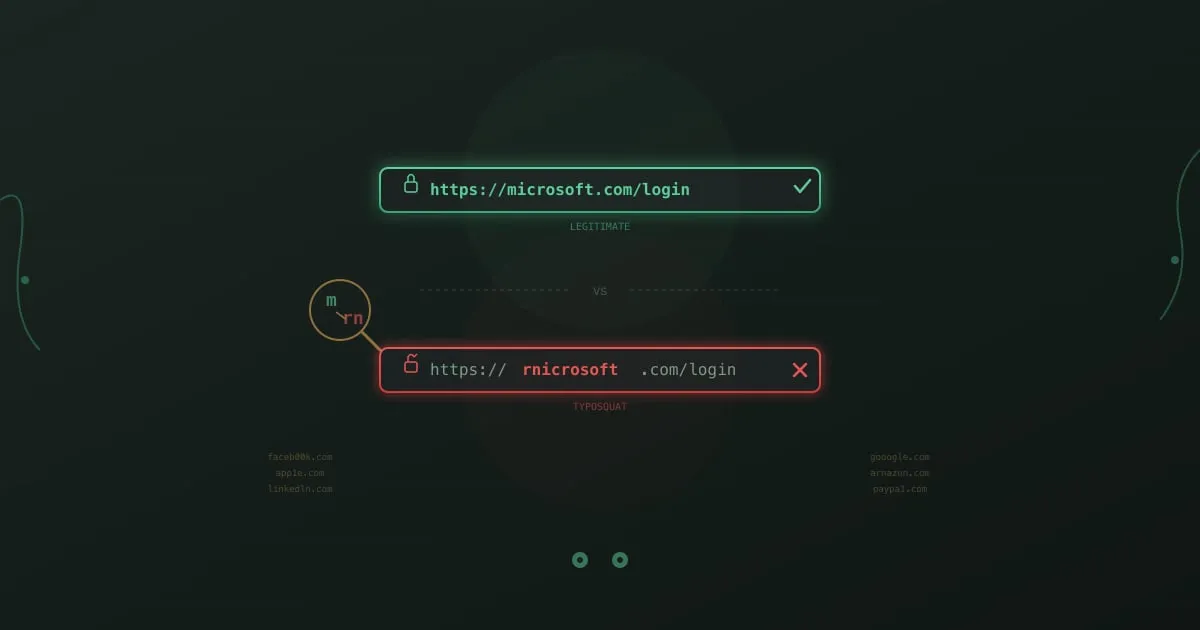
Comparison of a legitimate URL and a typosquatted URL showing how replacing the letter m with rn creates a convincing lookalike domain

Type “gogle.com” into your browser. You misspelled it. Twenty years ago, that typo would have landed you on a page stuffed with ads. Today, it might land you on a pixel-perfect replica of Google’s login page, one that captures your username and password before redirecting you to the real thing. You would never know.

This is typosquatting, and it has been around since domain names became valuable. What changed is the sophistication. Modern typosquatting campaigns do not just buy obvious misspellings. They register domains using character substitutions that are nearly invisible to the human eye, pair them with valid HTTPS certificates, and deploy them as part of targeted credential-harvesting operations against specific companies.

Palo Alto Networks’ Unit 42 found that roughly 13,857 squatting domains were registered per month in 2023, with typosquatting and combosquatting accounting for the majority. These are not opportunistic parked pages. Many are active phishing sites with a shelf life measured in hours, just long enough to harvest a batch of credentials before being reported and taken down.

RansomLeak + Cyber Helmets Partnership

Cyber Helmets and RansomLeak partnership announcement with both company logos

Ransomware and phishing attacks keep evolving in scale and sophistication. Theoretical training alone does not cut it anymore. Organizations need practical, experience-driven learning that mirrors how attacks actually happen.

That is why RansomLeak has partnered with Cyber Helmets to deliver cybersecurity training and awareness programs grounded in real-world ransomware intelligence.

Browser Security Training

Browser security training - browser window with protective shield against web-based cyber threats

An employee searches Google for a PDF converter. The first result looks right. Logo, branding, download button. She installs it. Within 48 hours, her browser credentials, saved passwords, and session tokens are exfiltrated to a server in Eastern Europe. The download page was a poisoned search result that ranked above the legitimate tool.

This is not a theoretical scenario. Palo Alto Unit 42 reported in 2024 that web browsers have become the number one enterprise attack vector, involved in over 80% of initial access incidents. Your firewall, endpoint agent, and email gateway don’t help much when the threat lives inside the browser itself.

Browsers have quietly become the operating system of work. SaaS apps, cloud consoles, internal tools, communication platforms. Nearly everything runs in a browser tab. And every one of those tabs is a potential attack surface that most security training ignores.